
mcpx is a one-command, no-account, local MCP cross-client installer: detect clients → write config → handshake-verify.



Adding an MCP server to your agent still means hand-editing a different JSON per client — mcpx add <server> collapses that into one command that writes into every client you have and handshake-verifies each.
 Architecture
One mcpx add: detect the coding-agent clients installed on this machine (Claude Code / Claude Desktop / Codex / Cursor), back up → idempotently merge into each one in its own schema (JSON key-path or a TOML table), then spawn the server over stdio JSON-RPC and run a handshake. Single process, single binary, no daemon, no MCP SDK.
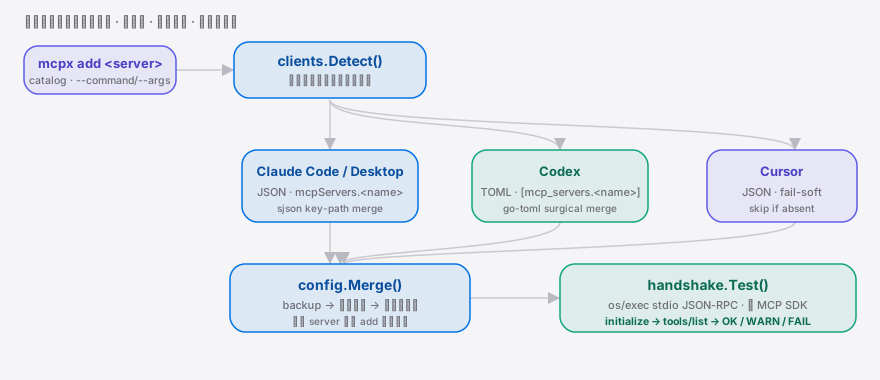
 Why this exists
The supply side of MCP servers is already huge (awesome-mcp-servers 90k★, chrome-devtools-mcp 45k★), but wiring one into a client is still manual: every client keeps its config at a different path with a different schema. You write it once for each Coding Agent — Claude Code, Cursor, Codex — restart each, and hope the handshake works. claude mcp add only solves Claude Code itself; the value concentrates on people who run more than one client. mcpx collapses 5-6 steps × N clients into one local command — backup first, touch only the entry it wrote, verify on the spot.
 Quickstart
go install github.com/SuperMarioYL/mcpx/cmd/mcpx@latest   # single binary onto PATH (< 30s)
mcpx add filesystem                                        # detect → backup → write → handshake
mcpx list                                                  # confirm every client got it
Real output (dev machine with 3 clients)
Detected 3 client(s): Claude Code, Claude Desktop, Codex
· Cursor not detected (no config at ~/.cursor/mcp.json)
Installing filesystem (npx -y @modelcontextprotocol/server-filesystem .) into 3 client(s)
Claude Code backup → write → merged
backup: ~/.claude.json.mcpx-bak-20260704-1126
✓ handshake OK (initialize + tools/list, 12 tools)
Claude Desktop backup → write → merged
✓ handshake OK (initialize + tools/list, 12 tools)
Codex backup → write → merged
✓ handshake OK (initialize + tools/list, 12 tools)
✓ 3/3 clients ready
Restart (or reload) the affected clients to pick up the new server. Usage
Usage
# Install a built-in server by name (backup → idempotent write → handshake)
mcpx add filesystem

# Not in the catalog? Pass an explicit command / args / env
mcpx add my-server --command npx --args '-y @my-scope/my-mcp-server' --env API_TOKEN=secret

# Restrict to specific clients, skip the prompt
mcpx add git --clients claude-code,codex --yes

# Preview without touching any file
mcpx add fetch --dry-run

# Undo — removes only the entry mcpx wrote, backup preserved
mcpx remove filesystem

# List the built-in catalog
mcpx catalog
More in examples/quickstart.sh.
Subcommands: add <server> · list · remove <server> (alias rm) · catalogGlobal flags: --clients c1,c2 · --dry-run · --yes/-y · --version/-v · --help/-h
 Demo
Demo

 Supported clients
| Client | Config file | Format | Status |
|---|---|---|---|
| Claude Code | ~/.claude.json | JSON (mcpServers.<name>, with type:"stdio") | ✓ verified |
| Claude Desktop | ~/Library/Application Support/Claude/claude_desktop_config.json (macOS) | JSON (mcpServers) | ✓ verified |
| Codex | ~/.codex/config.toml | TOML ([mcp_servers.<name>]) | ✓ verified |
| Cursor | ~/.cursor/mcp.json | JSON (mcpServers) | fail-soft: skipped if no config |
Undetected clients are never guess-written — mcpx only touches clients whose path is confirmed, and prints a clear "skipped" note for the rest.
 Comparison
Honest positioning — each alternative is better at something:
| Capability | mcpx | claude mcp add | awesome-mcp-servers | Smithery / mcp-get |
|---|---|---|---|---|
| One command writes into every detected client | ✓ | — (Claude Code only) | — (a directory) | partial (single-point / registry) |
| Handshake smoke-test after install | ✓ | — | — | — |
| Backup + idempotent merge (leaves your other keys alone) | ✓ | ✓ | n/a | partial |
| Local, no account, no cloud | ✓ | ✓ | ✓ | partial (cloud / registry-leaning) |
| Server discovery / catalog size | 8 built-in | — | ✓ 90k★, unmatched | ✓ |
In one line: catalogs tell you what exists, each client's own
addwrites itself, and mcpx writes across clients and proves the server actually connects.
 Pricing
The local core — detect, backup, cross-client write, handshake — is open source with no paywall, forever. Payment sits only at the "team sync / audit" layer:
| Tier | For | Price | What you get |
|---|---|---|---|
| OSS Core | Individual developers | Open source, free | Everything above this section |
| mcpx Teams | 5–30-person engineering teams | $5 / seat / month (team cap from $49/mo, ≤10 seats) | Hosted team manifest (a shared profile of "which servers + versions to install"), mcpx add --profile <team> to align the whole team in one command, CI checks that every member's config matches the team profile, audit log |
Teams is a v0.3+ wedge — v0.1 only stubs the roadmap and ships no Teams code. The local write action never sits behind a paywall.
 Roadmap
- [x] m1 —
mcpx add: detect → backup → idempotent write → handshake, per-client OK/WARN/FAIL - [x] m2 —
mcpx list/mcpx remove(re-backup before delete, keep other entries) - [x] m3 — 8-server built-in catalog +
--command/--args/--envfrom-spec; cross-platform single binary, bilingual README, demo, CI - [ ] More client adapters (implemented once each client's config path is confirmed)
- [ ]
mcpx doctor: health-check the MCP servers each client has installed - [ ] mcpx Teams: shared profile + CI gate + audit (the paid wedge)
 License & contributing
MIT. Issues and PRs welcome — please mention which clients you use and which one you'd like supported next.
Share this
mcpx — the one-command MCP installer that writes into every coding agent you have (Claude Code, Codex, Cursor) and handshake-verifies each. No account, no cloud. https://github.com/SuperMarioYL/mcpxMIT © 2026 SuperMarioYL